KA-STD-006 — Accounting Standard Flow Implementation (Record-to-Report)
Version: Odoo 19.0
Audience: Accounting Lead, AR/AP, Implementor
Apps: Accounting/Invoicing (+ Sales/Purchase integrations)
Objective: Implement standard finance operations: Invoices/Bills → Payments → Bank Reconciliation → Period Close → Reports
Scope (MVP)
Customer invoices and vendor bills from Sales/Purchase
Payments and bank reconciliation
Core financial reports (TB, GL, AR/AP aging)
Key standard decisions
Journals and numbering
Taxes and fiscal positions (if applicable)
Lock dates, period close process
Integration expectations from Sales/Purchase
Configuration steps
Accounting → Configuration
Chart of accounts, taxes, journals, payment methods
Validate customer invoice and vendor bill processes (from Sales/Purchase) (Odoo)
Data migration checklist
Opening balances (GL)
Opening AR/AP by partner
Open invoices/bills (only if required)
Bank opening balance
End-to-end process
Create/post invoice or bill
Register payment
Reconcile against bank statement lines
Month-end checks and close
UAT scenarios (minimum)
ACC-01 Invoice → payment → bank reconcile (Odoo)
ACC-02 Vendor bill → payment → bank reconcile (Odoo)
ACC-03 Trial balance and AR/AP aging agree to openings
Go-live checklist
Confirm cutover date and lock legacy
Post opening entries and reconcile starting point
Sign-off: trial balance matches legacy at cutover
References
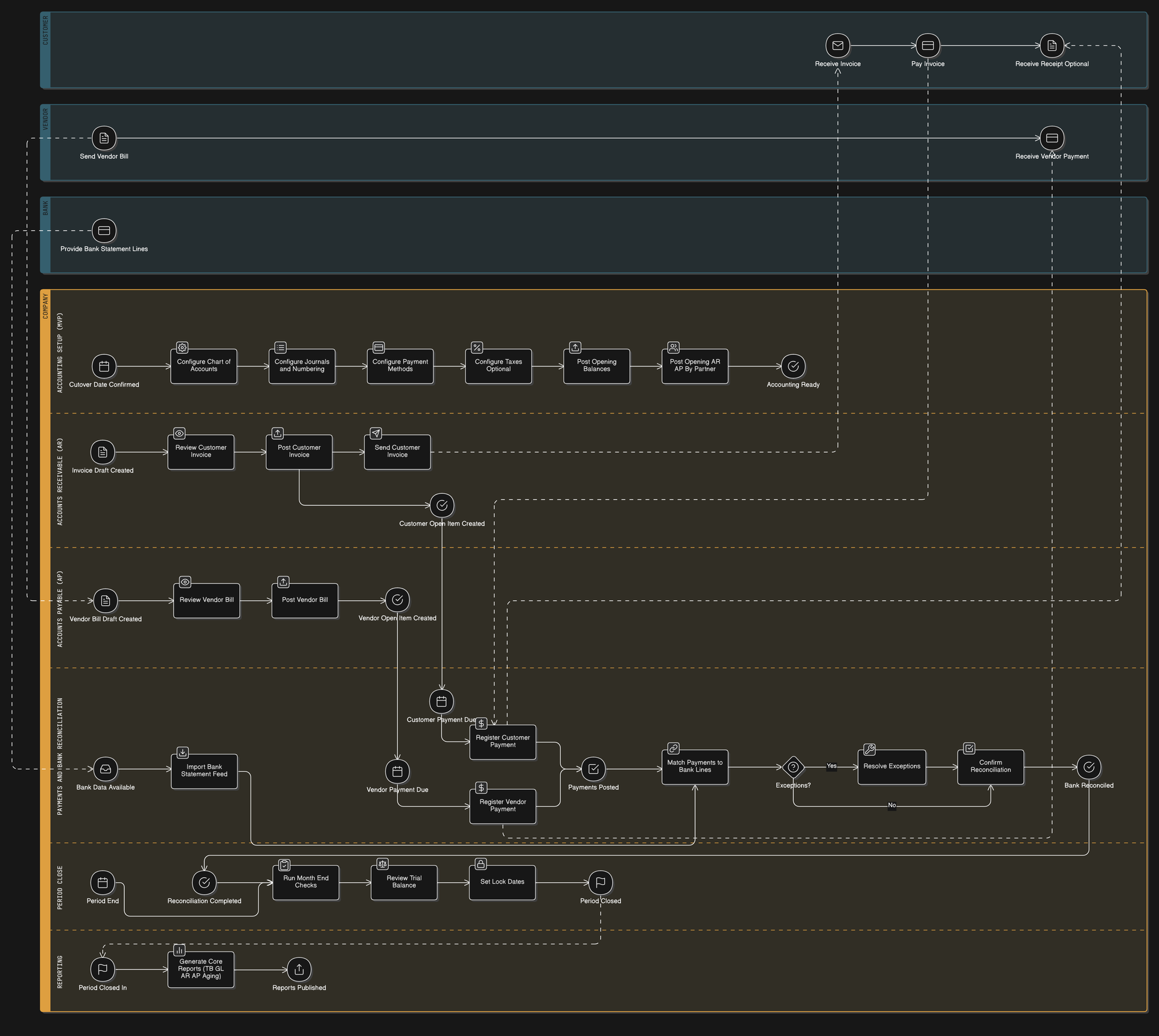
// BPMN for Accounting Standard Flow Implementation (Odoo 19.0)
title Accounting Standard Flow (Record-to-Report) — Input → Process → Output (Odoo 19.0)

// Pools and Lanes
Customer [color: lightblue] {
  Receive Invoice [type: event, icon: mail]
  Pay Invoice [type: event, icon: credit-card]
  Receive Receipt Optional [type: event, icon: file-text]
}

Vendor [color: lightblue] {
  Send Vendor Bill [type: event, icon: file-text]
  Receive Vendor Payment [type: event, icon: credit-card]
}

Bank [color: lightblue] {
  Provide Bank Statement Lines [type: event, icon: credit-card]
}

Company [color: orange] {

  Accounting Setup (MVP) [color: lightgray] {
    // INPUT
    Cutover Date Confirmed [type: event, icon: calendar]

    // PROCESS
    Configure Chart of Accounts [type: activity, icon: settings]
    Configure Journals and Numbering [type: activity, icon: list]
    Configure Payment Methods [type: activity, icon: credit-card]
    Configure Taxes Optional [type: activity, icon: percent]
    Post Opening Balances [type: activity, icon: upload]
    Post Opening AR AP By Partner [type: activity, icon: users]

    // OUTPUT
    Accounting Ready [type: event, icon: check-circle]
  }

  Accounts Receivable (AR) [color: yellow] {
    // INPUT
    Invoice Draft Created [type: event, icon: file-text]

    // PROCESS
    Review Customer Invoice [type: activity, icon: eye]
    Post Customer Invoice [type: activity, icon: upload]
    Send Customer Invoice [type: activity, icon: send]

    // OUTPUT
    Customer Open Item Created [type: event, icon: check-circle]
  }

  Accounts Payable (AP) [color: yellow] {
    // INPUT
    Vendor Bill Draft Created [type: event, icon: file-text]

    // PROCESS
    Review Vendor Bill [type: activity, icon: eye]
    Post Vendor Bill [type: activity, icon: upload]

    // OUTPUT
    Vendor Open Item Created [type: event, icon: check-circle]
  }

  Payments and Bank Reconciliation [color: green] {
    // INPUT
    Customer Payment Due [type: event, icon: calendar]
    Vendor Payment Due [type: event, icon: calendar]
    Bank Data Available [type: event, icon: inbox]

    // PROCESS
    Register Customer Payment [type: activity, icon: dollar-sign]
    Register Vendor Payment [type: activity, icon: dollar-sign]
    Payments Posted [type: event, icon: check-square]

    Import Bank Statement Feed [type: activity, icon: download]
    Match Payments to Bank Lines [type: activity, icon: link]
    Exceptions? [type: gateway, icon: help-circle]
    Resolve Exceptions [type: activity, icon: wrench]
    Confirm Reconciliation [type: activity, icon: check-square]

    // OUTPUT
    Bank Reconciled [type: event, icon: check-circle]
  }

  Period Close [color: purple] {
    // INPUT
    Period End [type: event, icon: calendar]
    Reconciliation Completed [type: event, icon: check-circle]

    // PROCESS
    Run Month End Checks [type: activity, icon: checklist]
    Review Trial Balance [type: activity, icon: scale]
    Set Lock Dates [type: activity, icon: lock]

    // OUTPUT
    Period Closed [type: event, icon: flag]
  }

  Reporting [color: lightpurple] {
    // INPUT
    Period Closed In [type: event, icon: flag]

    // PROCESS
    Generate Core Reports (TB GL AR AP Aging) [type: activity, icon: bar-chart-2]

    // OUTPUT
    Reports Published [type: event, icon: share]
  }
}

// -------------------------------------------------
// INTERNAL POOL TIMELINES (keeps swimlanes readable)
// -------------------------------------------------

Receive Invoice > Pay Invoice
Pay Invoice > Receive Receipt Optional

Send Vendor Bill > Receive Vendor Payment

Provide Bank Statement Lines

// -------------------------------------------------
// COMPANY SEQUENCE FLOWS (IPO per lane; one arrow per line)
// -------------------------------------------------

// Setup (IPO)
Cutover Date Confirmed > Configure Chart of Accounts
Configure Chart of Accounts > Configure Journals and Numbering
Configure Journals and Numbering > Configure Payment Methods
Configure Payment Methods > Configure Taxes Optional
Configure Taxes Optional > Post Opening Balances
Post Opening Balances > Post Opening AR AP By Partner
Post Opening AR AP By Partner > Accounting Ready

// AR (IPO)
Invoice Draft Created > Review Customer Invoice
Review Customer Invoice > Post Customer Invoice
Post Customer Invoice > Send Customer Invoice
Post Customer Invoice > Customer Open Item Created

// AP (IPO)
Vendor Bill Draft Created > Review Vendor Bill
Review Vendor Bill > Post Vendor Bill
Post Vendor Bill > Vendor Open Item Created

// Payments & Reconciliation (IPO)
Customer Open Item Created > Customer Payment Due
Vendor Open Item Created > Vendor Payment Due

Customer Payment Due > Register Customer Payment
Vendor Payment Due > Register Vendor Payment

Register Customer Payment > Payments Posted
Register Vendor Payment > Payments Posted

Bank Data Available > Import Bank Statement Feed
Import Bank Statement Feed > Match Payments to Bank Lines

Payments Posted > Match Payments to Bank Lines

Match Payments to Bank Lines > Exceptions?
Exceptions? > Confirm Reconciliation: No
Exceptions? > Resolve Exceptions: Yes
Resolve Exceptions > Confirm Reconciliation
Confirm Reconciliation > Bank Reconciled

// Period Close (IPO)
Bank Reconciled > Reconciliation Completed
Period End > Run Month End Checks
Reconciliation Completed > Run Month End Checks
Run Month End Checks > Review Trial Balance
Review Trial Balance > Set Lock Dates
Set Lock Dates > Period Closed

// Reporting (IPO)
Period Closed --> Period Closed In
Period Closed In > Generate Core Reports (TB GL AR AP Aging)
Generate Core Reports (TB GL AR AP Aging) > Reports Published

// -------------------------------------------------
// MESSAGE FLOWS (minimal & short to reduce overlaps)
// -------------------------------------------------

// Customer invoice and payment
Send Customer Invoice --> Receive Invoice
Pay Invoice --> Register Customer Payment
Register Customer Payment --> Receive Receipt Optional

// Vendor bill and payment
Send Vendor Bill --> Vendor Bill Draft Created
Register Vendor Payment --> Receive Vendor Payment

// Bank statements
Provide Bank Statement Lines --> Bank Data Available